Agent Management
Testing & Publishing
Test Your Agent
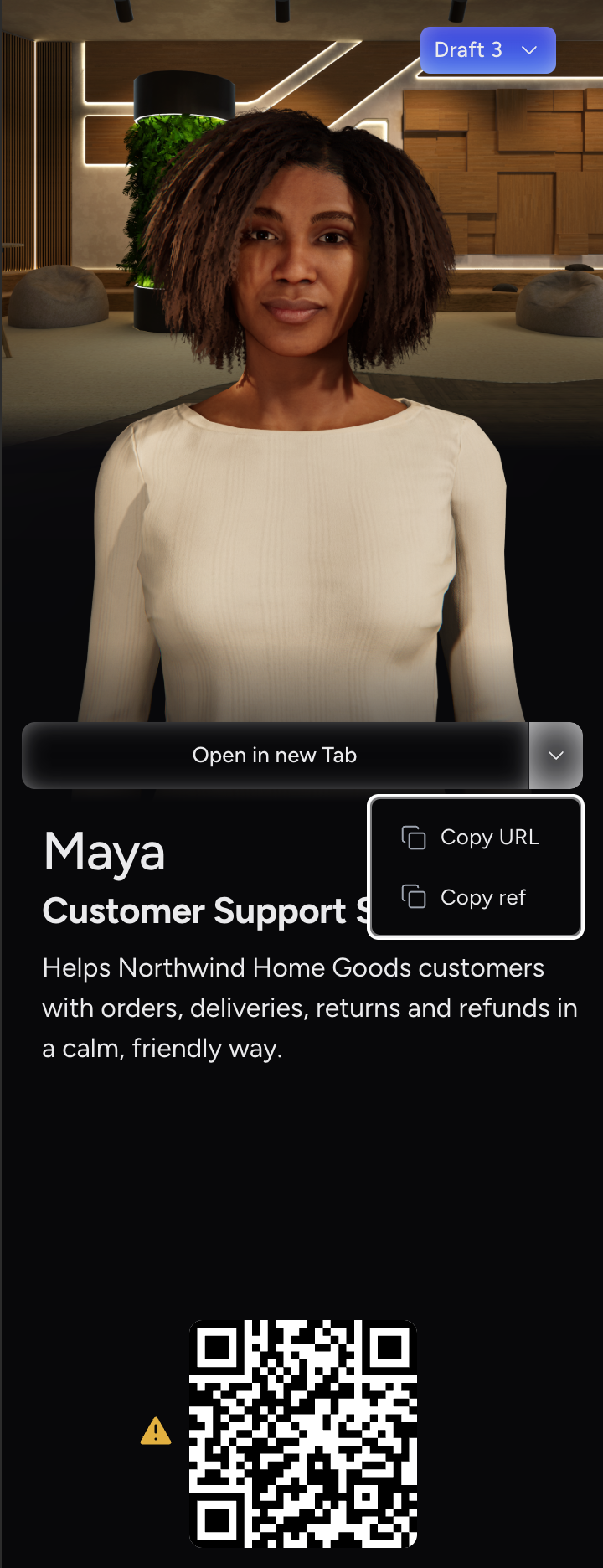
After the agent is saved for the first time, the preview panel on the right of the agent form shows the test options:
-
Open in new Tab opens the revision you are viewing in the standalone Web Client.
-
The arrow next to it offers Copy URL, which copies the full link, and Copy ref, which copies the agent reference on its own.
-
Scan the QR code to open the same revision in the PromethistAI client on your phone.
For a Published revision, the link and ref point to the live agent. For a Draft or Preview revision, they include the revision number, for example https://eu.promethist.ai/a/antonin_a07fk.6, so they always open exactly the revision you are viewing.
You need the agent’s reference when constructing Web Client URLs manually. Use Copy ref, or read it from the Reference column of the agent list.
|
If your account has no active subscription, a warning icon appears next to the QR code and the agent can’t be tested in the app or web client. See Billing. |
|
The preview panel, with the test options and the revision menu, is hidden on narrow screens. Use a wider browser window. To run many scored test conversations automatically before you publish, use Automated Testing. |
Revisions
|
What are Revisions for? Every time you save your agent’s configuration, a new revision is created automatically. This gives you a full history of changes — so you can test a new version without touching the live one, roll back if something goes wrong, and always know exactly what your users are experiencing. Each revision moves through a lifecycle:
|
Revision States
- Draft
-
The state of every newly saved revision. Each time you save, a new Draft is created on top of the latest revision, even when the revision you edited was already a Draft.
Only the latest revision can be edited. Opening an older revision, including an older Draft, shows it read-only.
- Preview
-
Used for testing. Anyone with the preview URL can test the agent, including people without access to the project. If the project requires people to sign in, they must sign in first.
Only one Preview revision can exist at a time. When you move another Draft to Preview, the previous Preview revision is automatically archived.
Preview is also the state to use when you want a test suite to run a revision you have not published yet. See Which Revisions a Test Runs.
- Published
-
The live, user-facing version. The agent URL (without a specific revision number) always opens the Published revision.
Only one Published revision can exist at a time. When you publish a new revision, the previous Published revision is automatically archived.
- Archived
-
A retired revision that is no longer available to the public. Archived revisions are not listed in the revision menu and can’t be restored.
|
Which URL opens which revision, and who can use it A URL without a revision number always opens the agent’s Published revision, for example A Published link works for anyone. A Preview link also works for anyone you send it to, even if they have no access to the project. If the project requires people to sign in, they will need to sign in first. This makes Preview the right state for leaving an agent available after a demo. A Draft or Archived link only opens for people who have a role on the project, so neither is suitable for sharing outside your team. |
Moving a Revision to Preview or Published
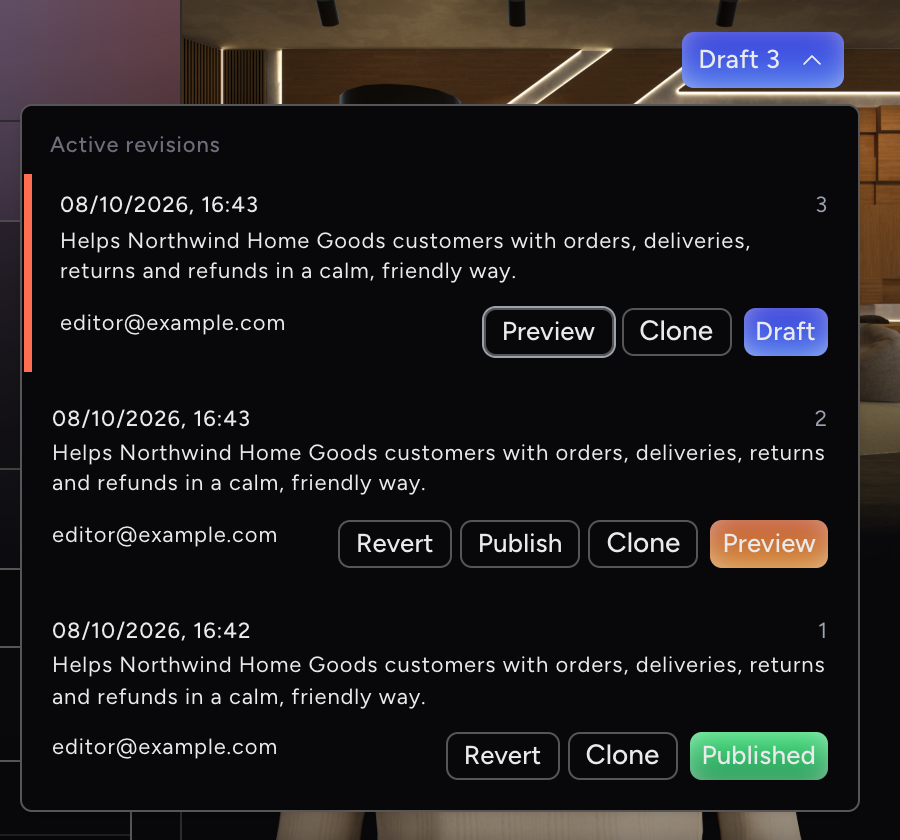
Revisions are managed from the revision menu at the top of the agent’s preview panel. The menu button shows the state and number of the revision you are viewing, for example Draft 3.
-
Click the revision menu. It lists the agent’s Active revisions, newest first. The revision you are viewing is marked with an orange bar, and each revision shows its state tag.
-
On a Draft revision, click Preview to move it to Preview.
-
Test the Preview revision. When you are happy with it, click Publish on that revision.
A revision always moves one step at a time: Draft → Preview → Published. You can’t publish a Draft directly.
|
Moving a revision to Preview or Published doesn’t check that the agent is complete. Test the agent before you publish it. |
Click any revision in the list to open it.
|
Viewers can open the revision menu and browse revisions, but its buttons are disabled for them. |
Cloning a Revision
Click Clone on any revision in the revision menu to create a new agent from that revision. The clone is created in the same project as a Draft named <agent name> - clone, keeps the attached evaluations, and opens straight away so you can rename and adjust it.
To clone the agent from the agent list instead, see Cloning Agents.
Reverting to a Previous Version
If you need to restore your agent to an earlier configuration:
-
Open the revision menu at the top of the preview panel.
-
Click Revert on the revision you want to restore.
-
Confirm with Yes, revert it.
The revision you revert to keeps its state and opens in the form.
|
Reverting archives all revisions created after the one you’re reverting to. Archived revisions can’t be restored. |
You can’t revert to an archived revision, or to a revision older than the current Preview or Published revision. Revert isn’t offered on the newest revision.
Archiving an Agent
Archiving retires the whole agent, not a single revision. It archives every revision at once and takes Preview and Published revisions offline immediately. You archive an agent from the agent list; see Archiving Agents.
|
Archiving can’t be undone. To reuse an archived agent’s configuration, clone it. |