Project Overview
Architecture
The platform is two deployable services — the Studio frontend and the platform backend — that sit next to the conversational engine on the same Kubernetes cluster, behind one host name per environment. This page describes what each part does, how traffic reaches it and where its data lives.
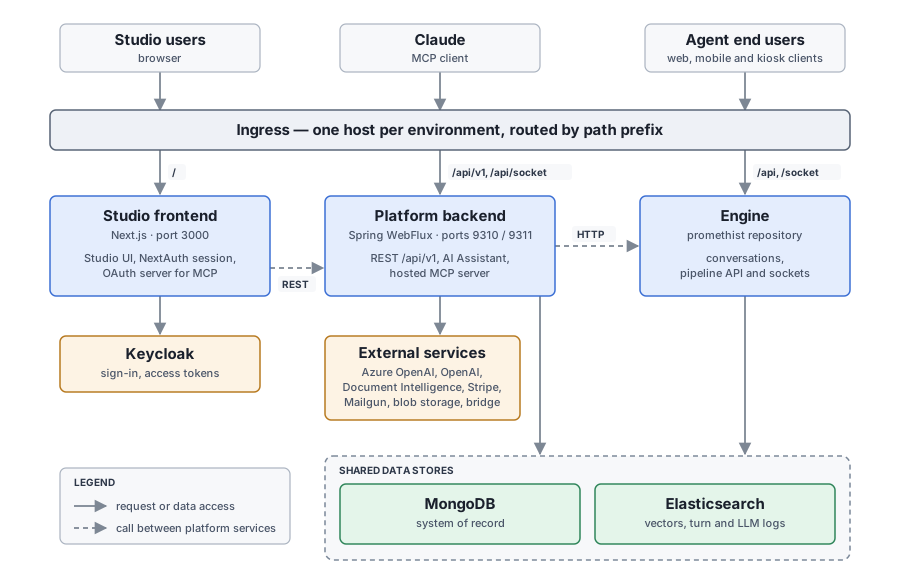
Components
| Component | Runs as | Responsibility |
|---|---|---|
Studio frontend |
Deployment |
The Next.js application users work in. Renders the Studio and the AI Assistant UI, signs users in through Keycloak (NextAuth) and keeps their tokens in an encrypted session cookie. It is also the OAuth 2.1 authorization server of the hosted MCP server: it serves the discovery documents, the authorize/token/registration endpoints and the signing keys (OAuth Authorization Server). |
Platform backend |
Deployment |
A reactive Spring Boot application. It owns the Studio’s REST API under |
Engine |
Service |
Runs the conversations. Clients reach it directly through the same host ( |
Bridge |
Separate service (repository |
Runs automated conversations between a simulated user and an agent. The backend creates its configurations and triggers runs for test suites. |
Client web application |
Service |
The end-user web client served under |
Keycloak |
Shared identity provider |
Authenticates Studio users (federated Google, Microsoft and company identity providers) and issues the access tokens the backend validates. |
The frontend and the backend scale independently. The backend keeps the AI Assistant’s working
state — the user’s current place in the UI, pending confirmations, the running turn — in the memory
of the process that holds the user’s Socket.IO connection; after a redeploy the client re-sends its
context to the new process (Reconnecting). The
open conversations of the MCP tool test_agent live in process memory as well, each holding its engine
socket in the pod that opened it (Live Agent
Tests). The ingress uses cookie-based session affinity.
How the backend is organized inside is described in Studio Backend, and its two interfaces for language models in AI Interfaces.
Request Routing
Each environment is served from one host name, for example eu.promethist.ai or
preview.eu.promethist.ai. The ingress that owns the host is defined in the backend Helm chart
(deploy/backend/helm/templates/ingress.yaml) and routes by path prefix; the longest matching
prefix wins.
| Path prefix | Target | What is behind it |
|---|---|---|
|
Frontend |
The Studio pages, the NextAuth callbacks, the OAuth endpoints |
|
Frontend |
NextAuth’s API, the contact form, and a voice-preview proxy that adds the session’s access token. |
|
Backend, port |
The REST API and the hosted MCP endpoint |
|
Backend, port |
The AI Assistant’s Socket.IO server. |
|
Backend, port |
The Stripe webhook, the staff-only vault read and Spring Boot Actuator ( |
|
Engine, HTTP port |
The engine’s REST API, its plain WebSocket and HTTP pipeline channels, and its debugger. |
|
Engine, Socket.IO port |
The engine’s Socket.IO pipeline. |
|
|
The end-user web client. |
Because /api belongs to the engine, a relative /api/... URL fetched by Studio code reaches
the Next.js server only under a prefix the ingress routes to the frontend; any other lands on the
engine, not on the Next.js server or the backend. A new route handler under /api therefore needs its
own ingress rule.
|
When app.legacyClient is enabled (the chart default) a second ingress serves the same routes on
legacy[-<suffix>].<domain>, with the client paths pointing at promethist-web-legacy.
Data Stores
| Store | What the platform keeps there |
|---|---|
MongoDB |
The system of record, shared with the engine and the bridge. The platform writes accounts,
projects (with their embedded asset specifications), agents, evaluation definitions, templates,
skills, members and invitations, account settings, test suites and its own bookkeeping (assistant
memory and chat history, export and upload records, usage records). It reads what the engine writes:
sessions, turns, evaluation results, feedback and the |
Elasticsearch |
Two unrelated uses. The knowledge vector store (Spring AI) holds the embedded chunks of every knowledge source; the engine searches the same index during conversations. The engine’s own indexes of turns and LLM calls are read by the conversation-data tools of the MCP server. |
Blob storage |
Account and project logos and the images and videos of interactive content, written through the
|
The domain model and the collection names are described in Domain Model.
Talking to the Engine
The platform and the engine are deliberately loosely coupled: they share the data model and the database, not an API. Configuration flows from the platform to the engine through MongoDB — the engine reads the agent revisions, project settings and asset specifications the platform saved — and results flow back the same way. The backend calls the engine in two places only, and hands its address to the bridge in a third:
-
Voice previews —
RealtimeConfigurationServicestreams a sample over HTTP from{engine}/api/pipeline/realtime-preview:{configurationId}for the voice cards. -
Live agent tests — the MCP tool
test_agentholds a text conversation over the WebSocket{engine}/socket/pipeline/agent:{ref}[.{revision}], one connection per conversation (Live Agent Tests). -
Bridge configurations — test-suite scenarios carry the engine URL and the pipeline key the bridge connects to.
Each of these resolves the engine’s address on its own. The voice preview always derives it from
app.domain and app.namespace, which every deployment sets: https://{domain} in the default
namespace and https://{namespace}.{domain} elsewhere, with a leading promethist- dropped from the
namespace (createUrlFromEnvironment in util/Functions.kt; with no domain it falls back to
http://localhost:3000). Test suites use
promethist.testing.engine-url when it is set and the same derivation otherwise, and test_agent
uses promethist.mcp.engine-url, which is mandatory.
Pipeline keys (agent:{ref} or agent:{ref}.{revision}), the engine’s REST API and its conversation
transports are documented in the Platform Core documentation.